Скачать Auto Clicker на Windows

Описание Auto Clicker
Auto Clicker will help you automate clicks in games and other applications. You can use the Standard or Advanced version according to what best suits your needs.
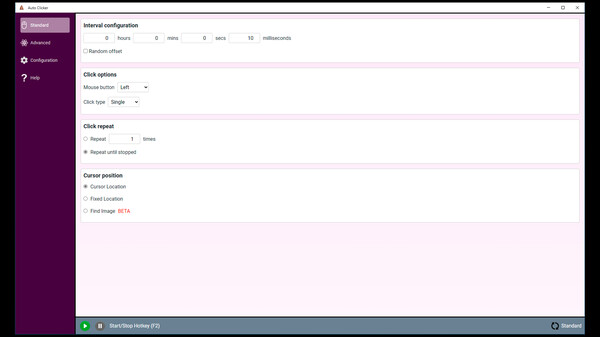
The standard clicker is the way to go if you want to quickly set up and run the clicker without any complex configurations.
Features:
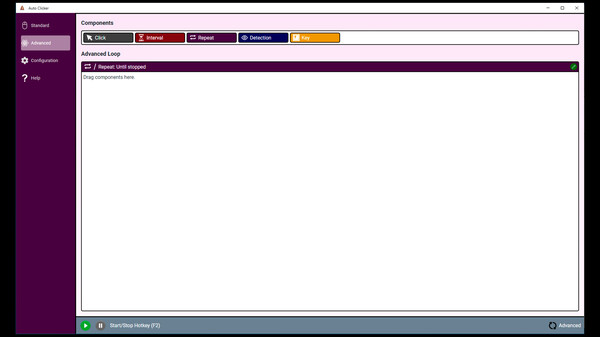
The advanced clicker has blocks that you can use to fully customize the clicking routine.
Features:
Standard Clicker
The standard clicker is the way to go if you want to quickly set up and run the clicker without any complex configurations.
Features:
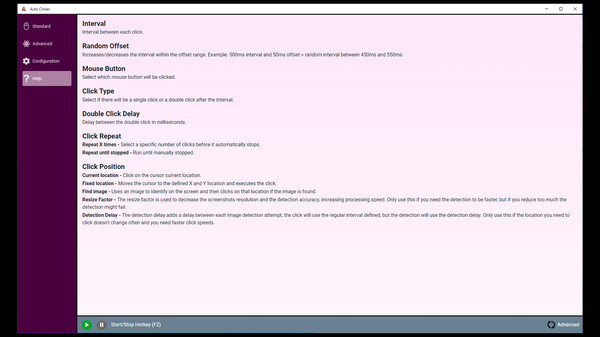
- Configure the interval between clicks with the option to set random offsets.
- Execute clicks with the left/right/middle mouse buttons.
- Change between single/double clicks.
- Set a specific amount of clicks to execute or run until stopped.
- Configure the click location to be on the mouse cursor, a fixed (X,Y) location, or add an image to find on the screen.
Advanced Clicker
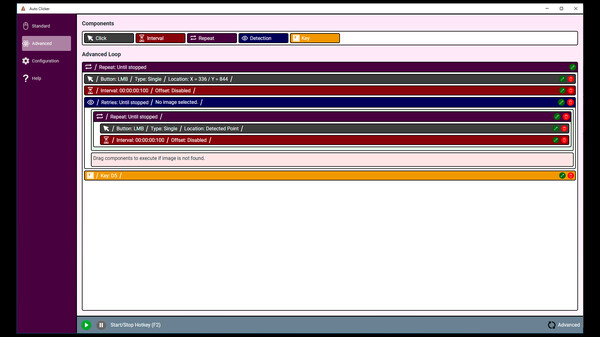
The advanced clicker has blocks that you can use to fully customize the clicking routine.
Features:
- Click block: Executes a click with the configured type and location.
- Interval block: Waits for the defined time before continuing with the next block.
- Repeat block: Executes what's inside the repeat block X times or until stopped.
- Detection block: Tries to find an image on the screen and executes the respective blocks in case of success/failure.
- Key block: Simulates a keypress of the defined key.
Notes
- Intervals are not fully precise and might take about 10ms more than what was defined. This won't happen if you set no interval (0ms).
- Image detection might fail on certain images. It also won't find images with different scale or rotation.
- Some applications/games might not recognize keys pressed by the key block on the advanced clicker.
Отзывы
|
Пока нет отзывов. Оставьте первый.
Скриншоты Auto Clicker